English |
 Português |
English |
Português |
|
|||||
|
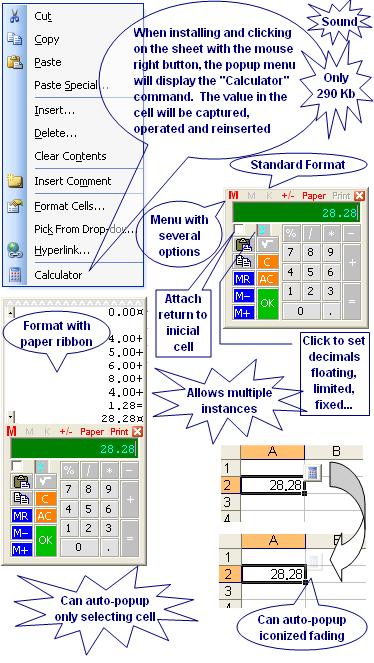
This utility is a COM add-in or add-in (.xla) programmed in Microsoft® Visual Basic® for Application (VBA) that generates a classic popup calculator in Microsoft® Excel® to capture values, operate, and insert results. See the pictures below. It consists of only one file, the ExcelCalculator.dll, which is about 290 kb in size and can be installed automatically using one of the installer package files available below to download. Except for the DLL, no other setting is saved in the Microsoft® Windows® Register. Its setting is saved in ExcelCalculator.ini, ExcelCalculatorHotKey.xla, and ExcelCalculator.xlam files that are created and maintained by the proper utility. You also can uninstall it automatically using the same installer file, leaving no mess on your Windows Register or disc. Following items in this page: Features:- Pops up in small size - Pops up close to the mouse cursor or optionally at the last saved position - Can auto-popup when selecting cells with decimal formats or cells specifically defined to auto-popup - Can pop up in three formats: normal, with paper ribbon, and iconized in cell (See next feature) - Can auto-popup iconized in cell with few or any disturbances in five ways: Fading 0%, Fading 50%, Fading 90%, Fast Fading and Close, and Slow Fading and Close. If the icon is clicked, the normal or with paper ribbon format pops up, if not, the icon goes away by itself when the Excel selection is changed - Addition, subtraction, multiplication and division operations - Supports decimals floating, decimals limited in result, and decimals limited when entering values with independent settings memory for each option - Decimals limited when entering values are also fixed as default while the value is entered, but they was temporarily released if the decimal separator is typed - Supports to limit up to 9 decimals in the result - Supports to limit up to 9 decimals when entering values. In this case, if positive, the result is limited in the same way without losing its settings - Still supports negative decimals when entering values. In this case, the value is automatically multiplied by 10 for every decimal place in fixed way while being entered and the result is limited to that defined in its settings - Square root - Memory - Changes sign number on the display - Operation with constant - Paper ribbon - Prints the paper ribbon - Captures and inserts on the selected cell - When capturing, if there is a selected text instead of a value, is a table column or a mix of numbers and text, and if there is more than one number, all are properly filtered with their signs, added up, and the result inserted in the display as initial value - Inserts and closes immediately. Tip! Down Ctrl key to insert without closing - Inserts without breaking the current thread of Excel ‘Undo’ command and any insertion can be normally undone by itself - Can be called by the mouse right button (Context menu), or by a button in the Excel Standard toolbar (2007, 2010, or 2013 Ribbon Add-ins tab), or by a keyboard shortcut key set by the proper user (hotkey) - Supports multiple instances within a single instance of Excel with independent controls, settings, and results. In practice quantities, there is no limit to the number of simultaneous instances - Paper show controls in all open instances or some of them can be attached to set simultaneously - Attached controls are distinguished by asterisks in the caption - Auto-popups can happen simultaneously in different cells, although no more than one in each cell - Instances created in cell auto-popups are tied to the same start cells to insert the result. In other popup types, this link is optional by way of a check box in the interface - The feature of multiple instances can be disabled - When multiples instances feature is disabled, there is an option to auto close when the Excel selection is changed - The display size can be adjusted through the borders to increase the font size from 8pt to until 32pt or decrease to until 3pt - Can copy the value on display to Windows Clipboard. Tip! When inserting with Shift key pressed, the result is sent to Windows Clipboard instead - Can paste on display existent value on Windows Clipboard - Accepts the following hotkeys that make it possible to pick values, make operators, and insert results only using the keyboard:
-
Popup Calculator: Any hotkey defined by user - The skin can be set up in: color and background picture, display and controls transparency, and hiding classic title bar - The last opened setting or the last closed instance setting will be used as default in the next new instance - Has menu commands to restore all default settings - All instances running can be closed with a single click by selecting the Close All command in the menu - Can be called directly from any VBA code through the fCalculator() function. See, soon below the pictures, a detail description of this function and examples of the VBA applications that use it - Modal or Modeless - Sound - Suitable to be called by the utility CellEasyEntry - Occupies less than 290 Kb when installed Download:Tested in Excel 2000, 2002(XP), 2003, 2007, 2010 (32-bit), 2013 (32-bit), and 2016-24 (32-bit) in MSI-based and Click-To-Run installations of Office 365™ cloud-based services.
See also for Microsoft Access®, for Microsoft PowerPoint®, and for Microsoft Word. Pictures:
fCalculator() Function:The Calculator can be called directly from any VBA code through the fCalculator() function that has these 8 optional arguments: 1 - IniValue (Display initial value, Default=0) 2 - DecimalsInResult (Long 0 to 9, Default=2 but start floating) 3 - DecimalsEnterFix (Long 0 to 9 and -1 to -9, Default=2 but start floating or limited if DecimalsInResult set) 4 - WaitAndRetValue (Long 0 to 2, Default=2). Where:
0 -
Not return value, not asynchronous, and modeless 5 - FontDisplaySize (Long 3 to 32, Default=8) 6 - ShowPaper (Boolean, Default=False) 7 - LeftPos (String, Default="0") 8 - TopPos (String, Default="0"). Where LeftPos and TopPos are the distances in points (1/72 inches) from the center right side of the Calculator to the current mouse position. If the values are preceded by $ (dollar sign), LeftPos and TopPos turn to be the distances from left top corner of the Calculator to the left top fix corner of the screen. And yet, if there is only the $ without number, will be used the current default position. Examples: 1 - The code below calls the calculator in modal to return result as Double to a userform. 2 - The code below calls the calculator in modeless to return result like in the right click command. 3 - Idem to capture and return date to active selection. About Add-in (.xla):Temporarily unavailable.
|
|||||
|
|
|||||
 POPUP CALCULATOR