English |
 Português |
English |
Português |
|
|||||||||||||||||||||||||||||||||||||||||
|
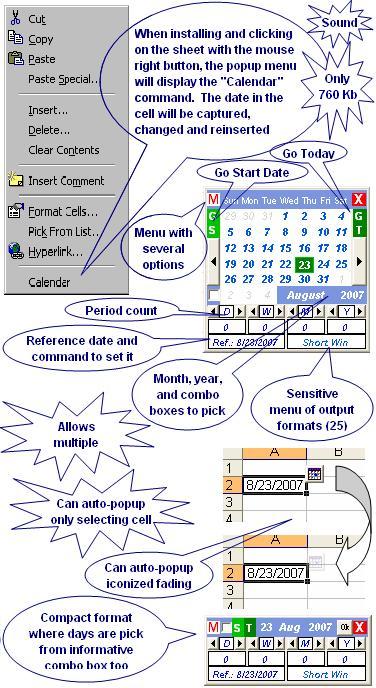
This utility generates a special popup calendar in Microsoft® Excel® to pick and count dates, may insert dates and date ranges (Date picker) in Excel. It is programmed in Microsoft Visual Basic® for Application (VBA) and optionally available as COM Add-in (dll), EXE Add-in (xla/exe), or Excel Add-in (xla), may be useful for Excel interface user and VBA programmers. See the pictures below. It consists basically of only one file (ExcelCalendar.dll, ExcelCalendar.exe, or ExcelCalendar.xla) that can be installed automatically using one of the installer package files available below to download. Except for the DLL, if you choose COM Add-in, no other setting is saved in the Microsoft Windows® Register. Its setting is saved in ExcelCalendar.ini, ExcelCalendarHotKey.xla, ExcelCalendarLoadExe.xla, and ExcelCalendar.xlam files that are created and maintained by the proper utility. You also can uninstall it automatically, leaving no mess on your Windows Register or disc. Following items in this page: Features:- Pops up in small size - Pops up close to the mouse cursor or optionally at the last saved position - Can auto-popup when selecting cells with date formats or cells specifically defined to auto-popup - Can pop up in three formats: normal, compact, and iconized in cell. In the normal format, days are picked from a traditional calendar map, while months and years are picked from combo boxes or by increasing/decreasing them through strategic arrow controls. In the compact format, days, months, and years are picked from special informative combo boxes. For the iconized in cell format, see the next feature - Can auto-popup iconized in cell with few or any disturbances in five ways: Fading 0%, Fading 50%, Fading 90%, Fast Fading and Close, and Slow Fading and Close. If the icon is clicked, the normal or compact format pops up, if not, the icon goes away by itself when the Excel selection is changed - Allows to increase and decrease days, weeks, months, and years one by one through buttons or by inserting amounts directly in textboxes - Period count: days, weeks, months and years from a reference date - Count reference date always can start set with Today’s Date, or Same Start Display Date, or Last Set Reference Date, but it also can be set on the fly by right-clicking the interface day controls - Interface controls to go to today’s date or back start date - Captures and inserts on the selected cell - If in the insert cell also includes time in addition to date, the existing time will be duly preserved. To pick and count times in similar way, use the Popup Clock for Excel utility in this site too - Inserts without breaking the current thread of Excel ‘Undo’ command and any insertion can be normally undone by itself - Can be called by the mouse right button (Context menu), or by a button in the Excel Standard toolbar (2007, 2010, or 2013 Ribbon Add-ins tab), or by a keyboard shortcut key set by the proper user (hotkey) - Output can be a variant (date) (computer-readable/unformatted date) or one of these 25 string formats (human-readable/formatted date): Short Win (defined by Windows Control Panel); dd/mm/yyyy (23/08/2007); dd/mm/yy (23/08/07); mm/dd/yyyy (08/23/2007); mm/dd/yy (08/23/07); dd.mm.yyyy (23.08.2007); dd.mm.yy (23.08.07); mm.dd.yyyy (08.23.2007); mm.dd.yy (08.23.07); yyyy.mm.dd (2007.08.23); yyyymmdd (20070823); mmm-yy (Aug-07); Long Win (defined by Windows Control Panel); Long 1 (August 07); Long 2 (23-Aug-07); Long 3 (23 August 07); Long 4 (23 August, 2007); Long 5 (Thursday, 23 August, 2007); Long 6 (twenty-third day of August, 2007); Long 7 (twenty-three day of August, 2007); Long 8 (twenty-three day of August month of two thousand seven year); Range 1 (234 days from 1/1/2007 to 8/23/2007); Range 2 (7 months and 22 days from 1/1/2007 to 8/23/2007); Range 3 (7 months and 22 days from 1/1/2007 to 8/23/2007); and Range 4 (33 weeks and 3 days from 1/1/2007 to 8/23/2007) - Output formats are listed in a sensitive menu according to current display date with immediate insertion and default output format redefinition to the next new instance - Popping up from a date formatted cell, the output will always be variant (date) and the output format menu will be hidden - Can handle dates from 01/01/0100 AC to 12/31/9999. Since Excel handles dates only from 12/30/1899 (00/00/0000), any date before this is always returned formatted as text. And the traditional electronic sheet bug about 1900 as a leap year was duly workarounded - Supports multiple instances within a single instance of Excel with independent controls, settings, counting, and results. In practice quantities, there is no limit to the number of simultaneous instances - Count reference date controls in all open instances or some of them can be attached to set simultaneously - Attached controls are distinguished by asterisks in the caption - Auto-popups can happen simultaneously in different cells, although no more than one in each cell - Instances created in cell auto-popups are tied to the same start cells to output returns. In other popup types, this link is optional by way of a check box in the interface - The feature of multiple instances can be disabled - When multiples instances feature is disabled, there is an option to auto close when the Excel selection is changed - The display size can be adjusted through the borders to increase the font size from 8pt to until 32pt or decrease to until 4pt - Can copy the date on display to Windows Clipboard. Tip! When inserting with Shift key pressed, the output is sent to Windows Clipboard instead - Can paste on display existent date on Windows Clipboard - Accepts the following hotkeys that make it possible to pick dates only using the keyboard, sometimes only two or three keystrokes:
- Popup
calendar: Any hotkey defined by user - The skin can be set up in: color and background picture, display and controls transparency, and hiding classic title bar - The last opened setting or the last closed instance setting will be used as default in the next new instance - Has menu commands to restore all default settings - The year-week number of a day is shown as a tip when mouseover the day control - All instances running can be closed with a single click by selecting the Close All command in the menu - Can be called directly from any VBA code through the fCalendar() function. See, soon below the pictures, a detail description of this function and examples of the VBA applications that use it - Modal or Modeless - Sound - Suitable to be called by the utility CellEasyEntry - Occupies about 760 Kb when installed Download:Tested in Excel for Windows, versions 2000, 2002(XP), 2003, 2007, 2010 (32 and 64-bit), 2013 (32 and 64-bit), 2016 (32 and 64-bit), and 2019 (32 and 64-bit) in MSI-based and Click-To-Run installations of Office 365™ cloud-based services.
See also for Microsoft Access®, for Microsoft PowerPoint®, and for Microsoft Word. Add-in Options to Install:This utility can be available to be installed in three options of add-ins: EXE Add-in, COM Add-in, or Excel Add-in. COM Add-in and Excel Add-in run on Windows in the same process or memory space of Excel and are well detailed technologies in Excel documentation and good books about VBA, while EXE Add-in is a special name here for a mix of those two technologies where the same VBA code is run in separate EXE process and a small Excel Add-in makes the connection between the two processes. Despite the differences in the technologies, this utility is fully functional in any of them. So, what can decide on your choice to install are the features below compared:
¹Temporarily unavailable. Pictures:
fCalendar() Function:The calendar can be called directly from any VBA code through the fCalendar() function that has these 7 optional arguments: 1 - IniDate (Date, Default=Today) 2 - RetDateAsDate (Boolean, Default=True)
3 - WaitAndRetValue
(Long 0 to 2, Default=2). Where: 4 - FontDisplaySize (Long 4 to 32, Default=8) 5 - CompactMode (Boolean, Default=False) 6 - LeftPos (String, Default="0") 7 - TopPos (String, Default="0"). Where LeftPos and TopPos are the distances in points (1/72 inches) from the center right side of the calendar to the current mouse position. If the values are preceded by $ (dollar sign), LeftPos and TopPos turn to be the distances from left top corner of the calendar to the left top fix corner of the screen. And yet, if there is only the $ without number, will be used the current default position. Examples if install as COM Add-in: The COM Add-in makes available an object to the VBA project by which the function is called in this format: ObjToVBA.fCalendar(IniDate, RetDateAsDate, WaitAndRetValue, FontDisplaySize, CompactMode, LeftPos, TopPos) See the codes of three examples: Examples if install as EXE add-in: The EXE add-in doesn’t make available objects to the VBA project and the function is called and returns through the Office CommandBars object. A string composed with the function name and arguments separated by semicolons is passed through the Parameter property of the utility command button created in Excel menu in this format: CmdBarCtrl.Parameter = "fCalendar;" & IniDate & ";" & RetDateAsDate & ";" & WaitAndRetValue & ";" & FontDisplaySize & ";" & CompactMode & ";" & LeftPos & ";" & TopPos See the codes of the same three examples: See also how to call the calendar from a VBA UserForm in Text Box to Input Dates in VBA Code.
|
|||||||||||||||||||||||||||||||||||||||||
|
|
|||||||||||||||||||||||||||||||||||||||||
 POPUP CALENDAR