English |
 Português |
English |
Português |
|
||||||||||||||||||||||||||||||||||||||||||
|
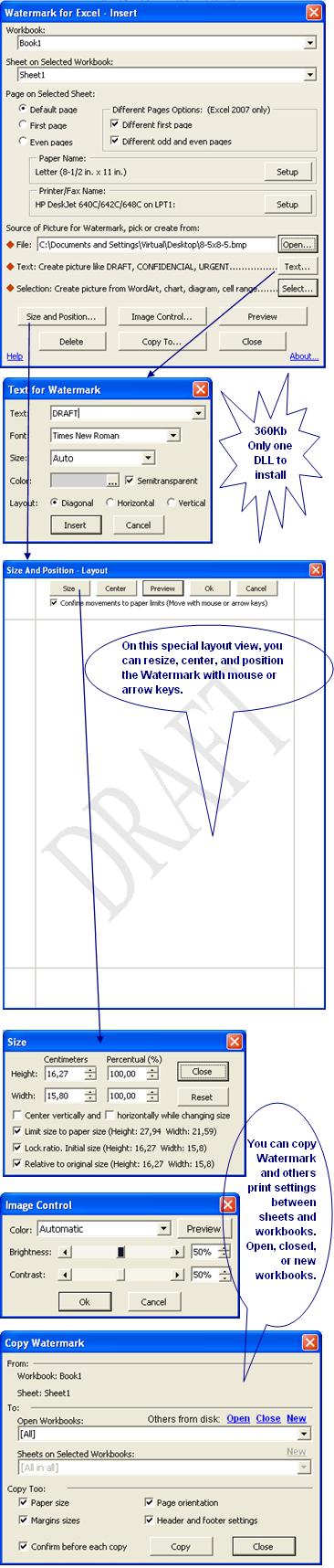
This utility makes it possible to insert printed watermark in sheets of Microsoft® Excel® 2002(XP) or later. It is not a workaround. It functions equal or better than the "Printed Watermark" command of the Word. Moreover inserting pictures, it permits still to position, change colors, change size, copy between sheets of opened and closed workbooks, and much more. Understanding concepts: Watermark normally is a ghosted text picture that is behind the content on the printed page. This is often used to indicate that a printed document is to be treated as specially, such as DRAFT, URGENT or CONFIDENTIAL. Pictures saved in several file formats (gif, jpg, bmp, etc.) can too be used to improve the aesthetics and to personalize printed documents. Excel Watermark is a header picture defined in the print page settings via the 'Page Setup...' command in the Excel menu. This utility consists basically of only one file (ExcelWatermark.dll, ExcelWatermark.exe, or ExcelWatermark.xla) that can be installed automatically ('Install' button above). Except for the DLL, if you choose COM Add-in, no other setting is saved in the Windows Register. Its setting is saved in ExcelWatermark.ini, ExcelWatermarkLoadExe.xla, and ExcelWatermark.xlam files that are created and maintained by the proper utility. You also can uninstall it automatically ('UnInstall' button above), leaving no mess on your Windows Register or disc.
Following items in this page: Features:- The watermark can be made from any picture saved in a file format that is recognized by Excel (e.g., *.emf; *.wmf; *.jpg; *.jpeg; *.jfif; *.jpe; *.png; *.bmp; *.dib; *.rle; *.gif; *.bmz; *.gfa; *.emz). - Text or phrases, such as DRAFT, CONFIDENTIAL, URGENT, can be inserted as a watermark as well. - A picture can be made from any selection on any open sheet and inserted as a watermark as well. The selection can be a cell, a cell range, an object, or a group of objects over the sheet (e.g., a chart, WordArt, a diagram, a shape, or AutoShape). (New in version 2.0 released on 10/17/10) - The picture can be centered in three different area options: the total area of the paper, the area under cell sheet plus the header and footer area, or just the area under the cell sheet. (Idem) - In Excel 2007 or newer, after the picture is centralized, it can be optionally anchored on the left margin of the print area to follow any changes in its size. (Idem) - In Excel 2007 or newer, different watermarks can be inserted on the first page, on the odd pages, or on the even pages. - You can adjust the color, brightness, contrast, position, and size of the picture; set up the page (e.g., change the paper size or margins); change the printer; and see a print preview without the need to exit from the inclusion forms. - The printed watermark picture can also be moved or enlarged beyond the limits of the paper (i.e., create an oversized image) if so desired. - You can insert a watermark on any of the sheets in any open workbooks, copy from one sheet to any other sheet in any open workbook, or copy to all other sheets at once in the same run. - Without exiting the form, the copy process can advance more to create new sheets and workbooks, close and open one or a batch of workbooks already saved on the disk. - When copying the watermark to other sheets, some other page and print settings can be copied as well if desired. - A watermark previously inserted can be duly deleted thru the utility or thru the Excel menu, see how soon below - After installed, the utility is called from Excel Format Menu > Sheet Submenu > Printed Watermark Command or, on the Excel 2007 or newer, from Ribbon > Page Layout Tab > Watermark Button. Download:Tested in Excel for Windows, versions 2002(XP), 2003, 2007, 2010 (32 and 64-bit), 2013 (32 and 64-bit), and 2016-21 (32 and 64-bit) in MSI-based and Click-To-Run installations of Office 365™ cloud-based services.
Add-in Options to Install:This utility can be available to be installed in three options of add-ins: EXE Add-in, COM Add-in, or Excel Add-in. COM Add-in and Excel Add-in run on Windows in the same process or memory space of Excel and are well detailed technologies in Excel documentation and good books about VBA, while EXE Add-in is a special name here for a mix of those two technologies where the same VBA code is run in separate EXE process and a small Excel Add-in makes the connection between the two processes. Despite the differences in the technologies, this utility is fully functional in any of them. So, what can decide on your choice to install are the features below compared:
¹Temporarily unavailable. Pictures:
Deleting Inserted Watermarks:Watermarks inserted thru this utility can be deleted too thru the Excel menu that way: - Open the Workbook in the Excel - Activate the Sheet with the Watermark to delete - On the Excel File menu, click Page Setup command or, on the Excel 2007, 2010, or 2013, Ribbon > Page Layout Tab > Page Setup Button - In the Page Setup dialog box, click Header/Footer tab - In the Header/Footer tab, click Custom Header button - Click in the Left section, select &[Picture] and then press Delete key.
|
||||||||||||||||||||||||||||||||||||||||||
|
|
||||||||||||||||||||||||||||||||||||||||||
 PRINTED WATERMARK