English |
 Português |
English |
Português |
|
|||
|
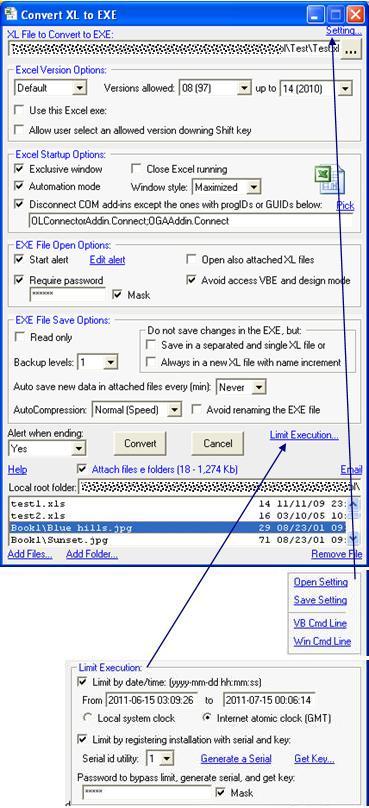
This utility converts Microsoft® Excel® files from original XL formats (XLS, XLA, XLT, XLAM, XLSM, XLTM, XLSB, XLSX, XLTX) to EXE format (convert XLS to EXE, convert XLA to EXE, convert XLSM to EXE, convert Excel to EXE). Like original XL files, the EXE files created are not independent of Excel, but they allow you to define Excel properties before opening, and improve the portability and functionality of your workbooks with or without macros and without macro alert, transferring EXE file properties to XL files. The conversion, moreover to maintain the original format features, inclusive for editing thru the Excel, adds others functionalities where the autocompression and the control over the Excel highlight. So, by be specialized in Excel and VBA, can be more advantageous than ZIP files, ZIP autoextracts and program installation utilities. See below the EXE format features and then some pictures and applying examples. Following items in this page: EXE Format Features:- Any Excel XL file format (*.xls; *.xla; *.xlt; *.xlam; *.xlsm; *.xltm; *.xlsb; *.xlsx; *.xltx) can be converted to EXE; Related to 'Excel Version Options' frame in the UI: - You can set the Excel version to be used as the default installed version, a specific installed version, or a version of an Excel EXE file indicated directly on the disk. (New in version 2.0 of 06/26/11) - When specifying the default Excel installed version to be used, you can limit the allowed versions, for example, if you limit the usable versions to 10 through 14, and the default installed version is version 9, then the EXE will not be opened on this version. (New in version 2.0 of 06/26/11) - If you choose to use a version directly from an Excel EXE file, you can specify the name and the path of the file on the disk or active drive. If you specify only the file name or the name with a partial path, in each execution the XLtoEXE will automatically look for a satisfactory EXE completing the path, and immediately use the first and the closest possible option. (New in version 2.0 of 06/26/11) - You can still allow the user to select an allowed version on the flight, if there is more than one installed, by holding down the Shift key while launching the EXE. The defined configuration is saved in an INI file next to the EXE to be used automatically in future executions, without holding down the Shift key. (New in version 2.0 of 06/26/11) Related to 'Excel Startup Options' frame in the UI: - Can be opened in the Excel without macro alert or with a custom alert (Good to work with known files containing macros using the Excel in medium or high security level). - Can be opened in an exclusive Excel window (exclusive Excel instance); it will refuse, while open, any attempt to share with an unfamiliar workbook, but accepts attached and new workbooks created during its execution. It also accepts workbooks with file names or full names set and passed in a list, as allowed or trusted by the VBA project at runtime (See Ex. 2). (Improved in version 2.0 of 06/26/11) - Can be forced the closure of running Excel instances at start up. This is helpful to use the EXE as an installer for a COM add-in. - When opened in a separate instance, it can start Excel in Automation mode, or very Automation mode; Excel will thus run totally clean without XLSTARTs, add-Ins, or COM add-ins. This is better than the /Automation Excel command line switch that doesn’t disconnect COM add-ins. However, the disconnection is optional and, if you disconnect, you can list exceptions by ProgIds or by GUIDs. All the different versions of the same COM add-in have a single ProgId, and the GUID are different for each version, or more precisely for each DLL build. (Improved in version 2.0 of 06/26/11) - When opened in a separate instance, it can control the Excel window style (maximize, minimize, normal, or hidden). These four last features are good to be used when your workbook is a dictator application. Related to 'EXE File Open Options' frame in the UI: - Can show, without text size limit, an alert before opening in the Excel (Good to installation alerts, copyright, guidance etc.). - Can require password-to-open so safe that only can be cracked by attempts (brute force) same knowing the converter source code. Then, if you put a password and forget it, no-one, neither this utility author, can help you. - All attached XL files can be opened also at start and controlled as one whole like a 'workbook' of workbooks - Can avoid access to Visual Basic Editor (VBE) and prevent the design mode. (New in version 2.0 of 06/26/11) - The handle of a window in Windows is passed to the VBA, so it can watch the EXE and take action when a program fails to run for some reason, for example, misuse of Ctrl+Alt+Del (See Ex. 2). (New in version 2.0 of 06/26/11) Related to 'EXE File Save Options' frame in the UI: - Can be read and write (Changes done in an EXE file opening in the Excel to write are saved in the proper EXE file). - Can be read-only, very read-only, doesn’t permit ‘Save’ and ‘Save as’ also. - When saving changes, a series of backups can be created and specially indexed to form levels of backups, and therefore levels of restoration, at an amount that you choose and set. You can choose from the least 0 (no backup) to a maximum of 100 or even 101 for indefinable levels, making possible more restoration levels than when using the XL format that supports one level or none. When you set levels of backups, at each new backup the existing ones are overwritten so that the most recent backup version is one of lower indexes or levels, while, if not set levels (101 option), existing backups are never overwritten and the most recent backups are the larger indexes. (Improved in version 2.0 of 06/26/11) - Changes can be saved to a new XL file, leaving the EXE unaltered (Good to be used like a template). - Changes can be saved to multiple XL files with an incrementing number (Good to be used like an invoice template). - There are four levels of autocompression: none, normal (faster), medium (slower), and high (slower). Normal is equivalent to a normal zip file. This makes large files more portable, mainly when they need protection, because protected files in XL format are of low compression. In a test with a simple workbook of 5 Mb, the ZIP compressed only 14% and this got 74% because the cryptography is done after the compression. - An EXE file open for editing can update (save) itself automatically when closing and also before closing in three other ways. The first happens through the Excel Workbook_BeforeSave event when changes are saved by the user in the converted XL, or an attached XL opens in Excel. The second, looking periodically for changes saved in any type of attached file; the size of the period in minutes to look for is set when converting, if it set to 0, the program will never look for changes. The third, by a command activated via the VBA project using the lXLtoEXE_SaveNow variable (See Ex. 2). (New in version 2.0 of 06/26/11) - An alert that says “Please wait ..." is shown while EXE files are opened, closed, or saved. (New in version 2.0 of 06/26/11) - You can avoid the original converted EXE file from being renamed. If it is renamed, it will not accept to open in Excel while its original name is not restored. Related to 'Limit Execution' popup frame in the UI: - You can limit the EXE execution by date range based on the local system clock or Internet atomic clock (GMT) and/or conditioning to the registry of the installation with a serial and key specific to each system or computer. You must provide a password so that you (and only you) can possibly execute beyond the defined limits and also generate serials and get keys to register installations by commands available in the XLtoEXE interface itself. Serials and keys are generated based on your password, then different passwords generate different serials and keys. Thus, only you or whoever has your password can generate valid serials and keys to your EXEs. It is a password so safe that it only can be cracked by attempts (brute force) same knowing the converter source code. Thus, if you put a password and forget it, no one, not even this utility author, can help you. No special access setting is required to limit with based on Internet atomic clock (GMT), the default setting set when you install the Internet browser is sufficient and usually necessary. (New in version 2.0 of 06/26/11) Related to 'Setting...' popup frame in the UI: - All the above features can be configured when you convert. - The conversion can be done thru the utility interface or by command line. - The command line can contain all of the options, alert text, and file names and paths to attach. You can generate long and complex command lines from the user interface and send them to the clipboard to be pasted anywhere, such as in an argument of VB or VBA Shell function or in the Windows Run dialog box. - The converted EXE file also accepts command line and passes entirely to your VBA project. - You can save in own file on disk all the settings set in a conversion to be used quickly in future conversions. If there is some kind of password in the setting, you will be asked to create a password to be required to open the file. Thus, only you or whoever has this password can open the setting file. It is a password so safe that it can only be cracked by attempts (brute force) same knowing the converter source code. Thus, if you put a password and forget it, no one, not even this utility author, can help you. (New in version 2.0 of 06/26/11) Related to non-specific frame in the UI: - The alert at the end of a successful conversion can be silenced with the option of maintaining (or not maintaining) a backup of the original converted XL. (New in version 2.0 of 06/26/11) - One or more text or binary files can be attached, as well as entire folders with all files and the tree of subfolders (Good to be used as installer file). (Improved in version 2.0 of 06/26/11) - Some options defined in the conversion can still be changed at runtime via VBA project using predefined variables that swap information with the VBA project. These variables also make possible XLtoEXE extra features and commands available only through the VBA project. In relation to the VBA project, their values or conditions can be read and/or write or read-only. See Ex. 2 how to use each of them in your VBA project. In all, XLtoEXE provides 11 predefined variables described below: 1 - sXLtoEXE_ThisWbPathExe (String, Read-only) - Name of the EXE file on the disk. 2 - sXLtoEXE_ThisWbNameExe (String, Read-only) - Path where the EXE file is found on the disk. 3 - lXLtoEXE_hWnd (Long, Somente leitura) - Handle of a window that XLtoEXE created in Windows specially for the VBA project watches it and take action when it fails to run for some reason, for example, misuse of Ctrl+Alt+Del. 4 - lXLtoEXE_AutoReopen (Long 1 or 2, Read and Write) - To XLtoEXE auto reopen after all closed, set 1 for normal reopen or 2 for reopen asking privilege elevation. And, especially, 3 to quit the same way, but not reopen. 5 - lXLtoEXE_WaitReopen (Long, Write) - Wait in seconds to auto reopen. 6 - sXLtoEXE_CmdLineReopen (String, Read and Write) - Command line argument to be passed to the VBA project when opening or auto reopening. 7 - lXLtoEXE_AvoidAccessVBE (Long 0, 1, or 2, Write) - Set as 1 to avoid access to VBE, 2 to allow, and 0 to follow the option set when converting. (New in version 2.0 of 06/26/11) 8 - lXLtoEXE_SaveNow (Long 0 or 1, Write) - Set as 1 to save this project now. All current changes by still to save, existing only in memory, will be saved to disk. This is especially useful when all data is saved in attached files and not in the XL file. If the project is read-only or there is not to save, it will be ignored. (New in version 2.0 of 06/26/11) 9 - sXLtoEXE_SaveAsExe (String, Write) - Set a full name for a new EXE file that will be created from the open EXE with all current changes by still to save, existing only in memory. The current EXE will be closed without the changes in memory and the new one will be open in its place already due saved. If the project is read-only, it will be ignored. (New in version 2.0 of 06/26/11) 10 - sXLtoEXE_SaveCopyAsExe (String, Write) - Set a full name for a new EXE file that will be created from the open EXE without the current changes by still to save, existing only in memory. The current EXE will continue open as it is and the new one will be closed duly saved without the changes that were only in memory. If the project is read-only, it will be ignored. (New in version 2.0 of 06/26/11) 11 - sXLtoEXE_TrustWbNames (String, Write) - List of trusted workbook names (with or without path) for XLtoEXE allows in exclusive window. Use ';' as separator. Path will be required on all names if there is at least one path separator character '\' on the list. (New in version 2.0 of 06/26/11)
- A converted EXE file that has in your name the text "Instl-", "-instl", "Runas-", or "-runas" in any position and form is always going to start asking for privilege elevation for Windows user account to administrator level. The EXE file can also be restarted automatically via VBA project to ask for elevation, making possible your VBA project start and work normally without administrator privileges, but with power to require elevation if necessary to execute some action or special feature (See Ex. 2). - The EXE file can be closed and scheduled via VBA project to be reopened automatically after some time. In addition, a command line argument can be set to execute an action immediately and automatically after reopening (See Ex. 2). - It provides for the VBA project the exe file properties as name, path, size and dates (See Ex. 2). - You can convert back to XL format using Excel Save As command if not read-only. - When convert, it creates a backup of the original XL format file without overwriting previous one. - Files in this format can function as EXE in CD Autorun. - The conversion only adds about 215 kb which, depending on the file size, can be regained during autocompression. - The converter and any converted files are standalone in the presence of the Office library, no extra library is necessary and neither changes in your Excel or Windows setting. Download:Tested in Excel for Windows, versions 97 (See Note), 2000, 2002(XP), 2003, 2007, 2010 (32 and 64-bit), 2013 (32 and 64-bit), and 2016-24 (32 and 64-bit) in MSI-based and Click-To-Run installations of Office 365™ cloud-based services.
See also DBtoEXE for Microsoft Access®, PPtoEXE for Microsoft PowerPoint®, and DOCtoEXE for Microsoft Word. Pictures:
Applying ExamplesYou can see below five applying examples. The first is related with Excel interface users, the second, third, and fourth, with VBA developers and, the last, with Autorun CD: 1 – In the link below, the XLtoEXE was used to convert to EXE a standard Excel file without macros, Book1.xls (could be an xlsx), where an Excel user interface made a confidential report with links to some pictures files (bmp, gif, jpg etc.) and referring others Excel workbooks that he/she would like to distribute jointly with Book1.xls without embedding in it but that is in a single, compressed, and protected file and with an opening alert. Downloading this EXE format file and clicking in it, it’ll be open directly on the Excel and you can change anything on it and save in the same way you’d do in a XLS format file: Some advantages of the conversion in this example: opening alert, only links don’t become the Excel workbook heavy, very well compressed although password protected, editable with all possible restoration levels, attached files are also editable, and exclusive Excel instance in maximized window.
2 – In the link below, the XLtoEXE was used to convert to EXE a standard Excel file with macros, Book2.xls (could be an xlsm), developed specially for VBA developers. It contains in VBA the ModXLtoEXE standard module with minimal, necessary, and sufficient code for the VBA project to exchange information with the EXE at runtime. Complete examples with code in other modules and command buttons and descriptions in the spreadsheet illustrate how is done the exchange of each one of possible information. In this example, see then, via VBA project: - How get EXE file properties: name, path, size, date-hour, if has administrator privilege, command-line argument, original xl file name, working temp folder, and Windows handle. - How close an EXE setting to reopen automatically in some seconds after. - How close an EXE setting to reopen automatically asking privilege elevation to administrator level on Windows. - How close an EXE setting to reopen automatically with command line argument to execute an action immediately and automatically after reopening. - How allow access to Visual Basic Editor (VBE) and design mode in an EXE that was converted using the "Avoid access VBE and design mode” option. - How watch the EXE to take some action when it is no longer running due to some weird reason as, for example, the misuse of Ctrl+Alt+Del. - How to Save Now an EXE directly without trigger of Excel Workbook_BeforeSave events. - How Save As another EXE. - How Save Copy As another EXE. - How trust and open a weird XL in an EXE that was converted using the "Exclusive window” option.
3 – It is common applications developed in VBA use an UserForm as User Interface (UI) instead of the Excel window that is usually minimized or hidden. In the link below, the XLtoEXE was used to convert to EXE a standard Excel file with macros, Book3.xls (could be an xlsm), that has an application developed with this feature. In this example, see then, the User Interface (UI) of an XL application running on hidden Excel. It is a simple VBA UserForm properly formatted to look like a window of a professional Windows application with these features: - A title bar with icon and controls to maximize, minimize, and restore the window size. - A bar of menus and toolbar buttons. - A status bar at the bottom. - Movable edges for size change. - Display the window title on Windows taskbar. - When converting the XL to EXE, it already starts with focus on Windows with Excel always hidden. - It doesn’t lose focus when issuing messages. - It can disable the keyboard and mouse itself until a task is completed. - Developed with the aim to be a template of starting or reference, it has a simple and compact code of easy editing to improve or remove what is not needed in similar project application.
4 – Some VBA developers have your proper utilities in XL to install and uninstall their add-Ins and COM add-ins totally developed in VBA like all in this site. These XLs can be converted to EXEs to open directly on the Excel. They open without macro alert regardless security level and still carry together the XLA, the DLL and any other necessary file. All in a single and compressed file. All add-ins and COM add-ins for Excel available on the site have their installers and uninstallers fully programmed in VBA in XLS files that are converted to EXE by XLtoEXE, packaging still other necessary files: Active Teach Ribbon for Excel® Cell Easy Entry for Excel®, and some others that you can see from a complete index here.
5 - Suppose that you want to mount a CD that opens automatically your Excel file of name MyApp.xla (The extension could be any other XL). Follow these three steps: 1 – Use XLtoEXE to converter MyApp.xla to MyApp.EXE defining how you want the Excel starting and attaching any necessary file 2 - On Windows Notepad, create and save a text file of name AUTORUN.INF with these two lines: [autorun] OPEN=MyApp.EXE 3 – Burn the CD with these files on the root: MyApp.EXE AUTORUN.INF Note: Optionally, to display on the Windows Explorer an own icon of your application, when the CD is inserted, add the following line at the AUTORUN.INF: ICON=MyApp.ico . The file MyApp.ico that can be created by an icon application like Microangelo (www.impactsoft.com) must be present also on the CD root.
|
|||
|
|
|||
 XL TO EXE CONVERTER - XLtoEXE